Building Defensive Software
· Matt Senter
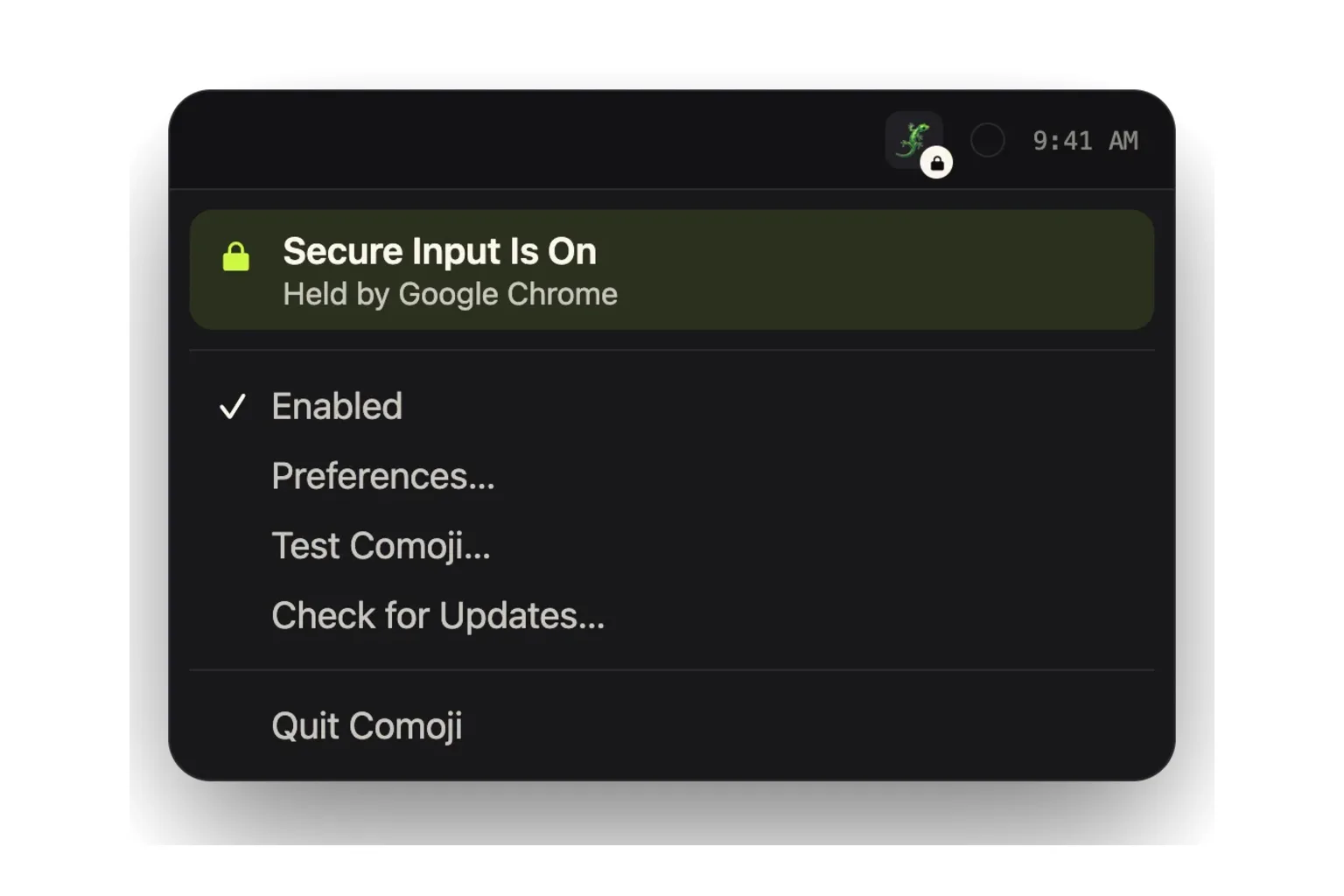
My laptop recently ran out of battery and died. After I plugged it in and rebooted, Comoji stopped working. I would type an emoji shortcut and nothing would happen. No explanation, no indication that anything had changed. Just an app that had worked before the shutdown and apparently did not work anymore.
Comoji is my little Mac app that gives you emoji autocomplete in the text fields you already use. Its job is straightforward: recognize a shortcut, offer matching emoji, and get out of your way. When that stops happening, there is not much of a product left to interact with.
Except Comoji had not actually broken. It was respecting a security boundary that something else on my computer had gotten stuck behind.
Why can doing the right thing look like doing nothing?
macOS has a feature called Secure Input that protects sensitive keyboard input from being intercepted by other processes. That is important for an app like Comoji, which needs to recognize what you type to offer autocomplete. An emoji utility has no business watching you enter a password, so Comoji deliberately stands down while Secure Input is active.
In this case, Chrome showed up as the process holding Secure Input, even though I was no longer entering a password. I killed Chrome, expecting that to clear things up. Instead, Secure Input remained active, and now it was associated with Apple’s login process. Whatever had gone sideways after the reboot, closing the browser had not been enough to resolve it.
This is a class of problem Apple itself has documented. An application that leaves Secure Input enabled when it is no longer needed can interfere with other applications that depend on keyboard events, even after the offending application moves into the background. The security mechanism continues doing its job, but software elsewhere on the machine suffers the consequences.
That was the situation Comoji was in. It was correctly refusing to operate while the system said keyboard input needed protection. But none of that was visible to me. I had written the app, and even I initially saw only that it had stopped working.
A user should not need to investigate operating-system state to understand why their emoji shortcuts suddenly do nothing.
Why is “not my bug” not a complete answer?
There is an understandable temptation to stop investigating once you establish that a problem originates outside your code. Chrome was holding Secure Input. Then Apple’s login process was involved. Comoji was behaving exactly as intended. Case closed, right?
Not really. That explains who caused the problem, but it does not help the person trying to use my app. They are not looking at process ownership or deciding which company deserves a bug report. They are looking at Comoji and wondering why it does not work.
The underlying input problem was outside Comoji. The lack of an explanation was something I could fix.
This is where defensive software development goes beyond checking for invalid arguments and catching exceptions. You also have to think about what your application looks like when the environment around it stops behaving correctly. Can the user distinguish a deliberate pause from a crash? Do they know what is preventing the app from working? Have you given them somewhere useful to go next?
Being technically correct is not much comfort when your product looks broken.
What did I change? A little lock instead of a mystery
I added a small lock indicator to Comoji’s menu bar icon whenever Secure Input is active. Now there is a visible reason for the missing autocomplete: Comoji is paused because keyboard input is protected. The app is no longer silently presenting an unavailable feature as though it should be working.
I also linked the tray menu to a help article explaining what Secure Input is and why Comoji respects it. Someone who gets stuck can reach that explanation from the app itself, rather than having to guess the right search terms or contact me to discover that this system feature exists.
The important part is what I did not try to solve. The answer was not to work around password protection just to make emoji autocomplete function. Secure Input being active is not, by itself, an error. It exists for a good reason, and Apple explicitly warns that enabling secure keyboard entry can affect other apps that need those keystrokes.
The lock therefore communicates a state, not a crisis. During normal password entry, it explains why Comoji is temporarily unavailable. When that state persists unexpectedly, it gives the user a starting point for understanding what happened.
I did not make Chrome or macOS incapable of getting stuck. I made their getting stuck less confusing for someone using Comoji, without weakening the protection Comoji was supposed to respect.
Why are big companies still external dependencies?
There is something irritating about hardening a tiny utility against problems involving Google’s browser and Apple’s operating system. These are not obscure components I dragged into the project without thinking. They are products from two enormous technology companies, and their behavior still managed to make my little app look defective.
But their size does not change the engineering decision. I cannot build Comoji on the assumption that everything produced by a company bigger than mine will always behave correctly. I also cannot tell a frustrated user that the problem belongs to a sufficiently impressive company and consider my work finished.
I do not know how frequently this particular sequence happens. It may be unusual. But I experienced it, and the result exposed a useful distinction: Comoji already handled the security condition safely; it did not yet handle the resulting confusion well.
That does not mean every hypothetical failure deserves a new setting, warning dialog, or recovery subsystem. In this case, the response was small and directly related to the problem. A lock icon made the condition visible. A help article made it understandable. Neither required pretending I could repair another application from inside my own.
To me, that is an important part of building defensive software. Your responsibility does not stop at ensuring that your code works when everything around it works. You also need to decide what happens when it cannot do its job, including when the reason is somebody else’s mistake.
Sometimes the right behavior is to stop. Good software should be able to tell you why.