Burly
Burly becomes the system handler for the links you click and lets you pick which browser profile each one opens in: Safari Work vs. Personal, Chrome Dev vs. Personal, and so on.
Click a link from Mail, Slack, Messages, or Terminal and a fast, keyboard-friendly picker sends the page exactly where it belongs. Hold a modifier to skip the picker and open straight in your last-used destination.
Download for Mac ↗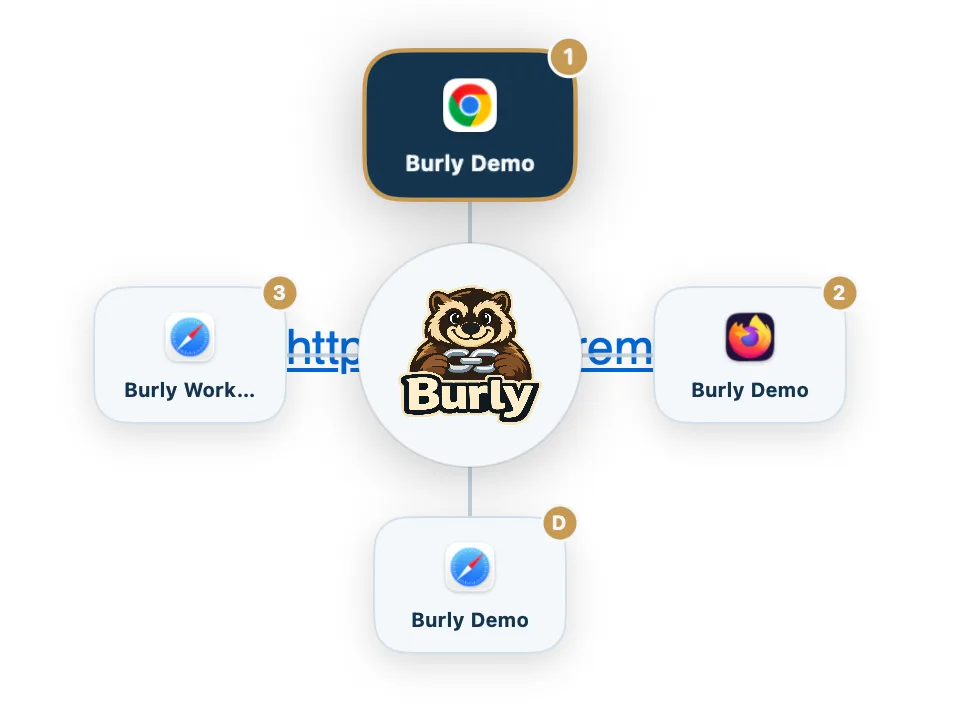
The problem
You run multiple browsers and multiple profiles to keep contexts separate. But when you click a link, macOS dumps it into whatever the default browser happens to be, and you spend the next minute dragging the tab to the right place.
Burly intercepts that click and routes it for you, so work links land in work and personal links land in personal.
Fast and keyboard-first
A radial picker appears the instant a link arrives. Pick a destination by keyboard, or hold a modifier to bypass the picker entirely and reopen your last-used profile.
- Becomes your system http/https handler
- Safari, Chrome, Brave, Edge, Vivaldi, Arc, and the Firefox family
- Profiles discovered automatically and kept live, no manual refresh
- Modifier-key bypass for your last-used destination
Private by design
Everything happens locally on your Mac. There is no account, no cloud, no analytics, and no URL ever leaves the device. Burly is a native menu bar app, signed and notarized.
A normal Tuesday with Burly
A colleague sends a document link in Slack. I click it, a radial picker blooms under the cursor, I press the key for Safari Work, and the doc opens in the profile that is already signed into the right account. Ten seconds of tab logistics that never happened.
Then I click three more work links in a row. On those I hold the modifier and skip the picker entirely, because my links come in streaks and being asked every single time would become its own annoyance. The bypass makes the common case free and saves the choice for when it matters.
What Burly does not do
It does not have a rules engine, and that is the main thing separating it from the paid apps in this category. Rules ask you to predict in advance where a domain belongs and then maintain that prediction forever. My routing is not really about the domain; the same link belongs in work in one moment and personal in another.
It does not see your browsing, because there is nothing on the other end to see it with. No account, no cloud, no analytics, and no URL ever leaves the device. For a tool that handles every link you click, data never collected is the only guarantee worth making.
Requirements and price
Burly is free, native, signed, and notarized, and becomes your system handler for http and https links. It discovers profiles automatically across Safari, Chrome, Brave, Edge, Vivaldi, Arc, and the Firefox family, including Safari profiles, which most alternatives cannot reach.