Microsoft’s Account Recovery Is Security Theater
· Matt Senter
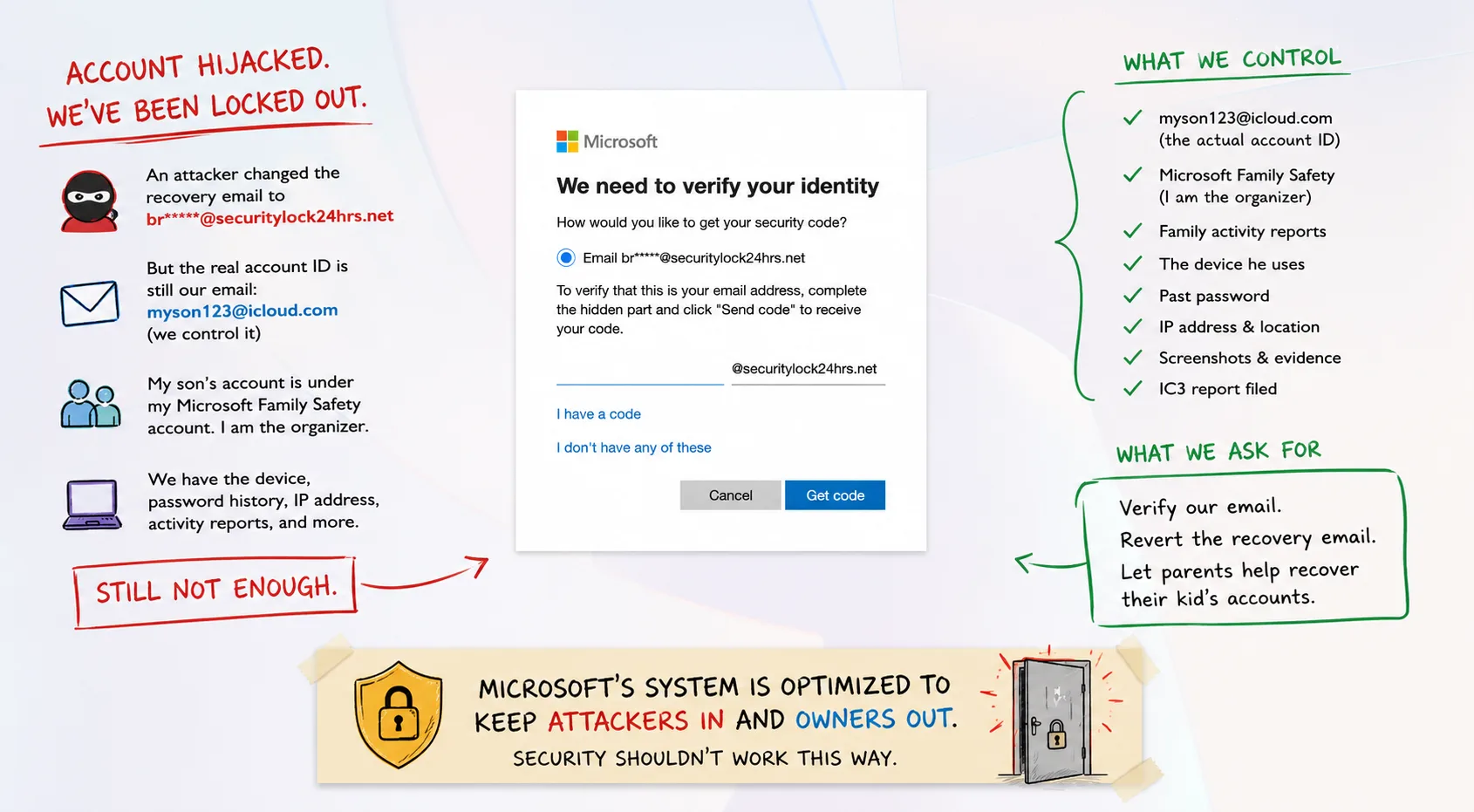
My son’s Microsoft account was hijacked a couple of weeks ago, and I have spent an unreasonable amount of time since then trying to convince Microsoft to give it back.
I know the Microsoft account ID. I control the email address used as that ID. My son is a child in my Microsoft Family Safety account, where I am the organizer. I have the computer he used, his previous password, his device IDs, his historical Family Safety reports, screenshots showing the account before and after it was compromised, and the IP address from which he normally used it.
Microsoft still will not recover the account.
The problem is not that Microsoft lacks evidence. The problem is that Microsoft’s recovery system does not seem capable of reasoning about evidence that falls outside its script. That is where security stops being security and becomes theater.
How the account was hijacked
For privacy, let’s say my son’s Microsoft account is myson123@icloud.com.
We are not certain exactly how the compromise occurred, but we believe it may have originated with a scam on Discord, where my tweenage son talks with friends about Minecraft and other games.
At some point, an attacker gained access to his Microsoft account and replaced its recovery information. Now, when we attempt to recover the account, Microsoft wants to send the verification code to br***@securitylock24hrs.net.
That is not our email address. It belongs to the attacker. The particularly strange part is thatmyson123@icloud.com remains the Microsoft account’s sign-in identity. We control that iCloud account. The attacker does not. Yet Microsoft will not simply send a verification message there.
Instead, Microsoft’s account recovery system insists on communicating through the security information that the attacker changed. The attacker compromises the account, changes the recovery address, and Microsoft then treats the attacker’s recovery address as more authoritative than the original email address still associated with the account.
That is a pretty good arrangement for the attacker.
This appears to be a known attack pattern
After seeing securitylock24hrs.net, I searched for the domain and immediately found other people reporting Microsoft accounts compromised with recovery addresses at the exact same domain. Several Microsoft Q&A threads from 2026 describe users suddenly seeing unfamiliar@securitylock24hrs.net addresses after account compromises. One victim specifically described the compromise happening after a verification process associated with a Minecraft Discord server.
See: Microsoft Q&A: securitylock24hrs.net
There is a recognizable pattern:
- The original account owner loses access.
- The security information gets changed.
- A recovery address at
securitylock24hrs.netappears. - The legitimate owner is unable to use normal recovery methods.
That should be a signal. Instead, Microsoft’s recovery system treats the attacker’s newly added address as authoritative.
What happens when account recovery fails you?
Welcome to the recovery maze. Microsoft does have an account recovery process. In fact, it has several, which is part of the problem. The normal recovery form asks you to prove ownership by supplying information about the account. Microsoft says the form intentionally asks questions that only the account owner should know and recommends submitting it from a previously used device and location.
See: Microsoft Support: Help with the Microsoft account recovery form
That sounds reasonable until you consider that this is a child’s account. My son has never purchased anything through this Microsoft account, so there is no useful credit card history. He does not use Outlook for email, so there are no message subject lines or contacts to identify. He does not use Xbox. He is a kid who uses a Microsoft account primarily because Windows and Minecraft want him to have one.
Nevertheless, during the recovery process I have been asked for all of the following:
- ACSR number: I have submitted the recovery form four times and have never received one. The recovery process asks for an identifier its own recovery process has failed to provide.
- Contact email, phone number, IP address, country, state, and ZIP code: Provided. Apparently not sufficient.
- Payment information and proof of purchase: There is none. He is a child and has never purchased anything through this account.
- Child’s name and date of birth: I supplied his real name, nickname, and online handle. I do not know what date was entered years ago, and I cannot simply view or verify it through Family Safety.
- Xbox information: None. He does not have an Xbox associated with the account.
- Account creation date, last login, and last password change: Estimated, because Microsoft knows this history and I cannot find it in Family Safety.
- Windows Device ID: I found the identifier Microsoft directed me to inside a JSON file and supplied it. I also supplied the more prominent device ID available in Windows settings. Still not enough.
At some point, you have to ask what the purpose of collecting all of this information actually is if none of it can move the process forward.
Microsoft already knows I am his parent
My son’s account is a child account inside my Microsoft Family Safety family, and I am the organizer. Microsoft describes Family organizers as the administrators of family groups. Organizers can manage permissions, screen time, content filters, spending, consent, and activity reporting.
See: Microsoft Support: Set up Microsoft Family Safety
I continue to receive weekly Microsoft Family Safety emails about my son’s account. I sent Microsoft those reports, including reports from before and after the compromise. I showed them my own Microsoft account and its relationship to his. I showed them the Windows computer attached to the account. That computer now repeatedly asks my son to sign back into Microsoft Family Safety, but he cannot because his Microsoft account was hijacked.
Microsoft trusts me enough to supervise the child, approve purchases, restrict apps, monitor activity, and manage his digital life, but it does not trust me enough to help recover his account. Family Safety gives me no way to reset the child’s Microsoft account. If Microsoft is going to maintain a verified parent-child relationship, account recovery is one of the most important situations in which that relationship should matter.
Why doesn’t Microsoft just email the iCloud address?
There is a legitimate security argument here. Microsoft distinguishes between an account’s sign-in identity and its designated security information. An email address used to sign into a Microsoft account is not automatically treated as sufficient proof that the person controlling that mailbox owns the Microsoft account.
At first glance, that seems reasonable. You do not want someone to gain control of an external mailbox and automatically use that to seize a Microsoft account too. But Microsoft is already trusting an external mailbox as part of the recovery process. When Microsoft sends a recovery code to a designated recovery email address, it is relying on another email provider to authenticate the person receiving that message.
I am not arguing that control of myson123@icloud.com should automatically authorize a password reset in every case. I am arguing that it is powerful evidence, especially when combined with everything else Microsoft already knows. In our case, Microsoft has all of these signals:
- The original iCloud address associated with the Microsoft account and our continued control of it.
- A previous Microsoft password, a known Windows device, and multiple device identifiers.
- The parent account linked through Microsoft Family Safety and years of activity reports.
- The normal household IP address, geographic information, and screenshots before and after the compromise.
- A recovery address using a domain publicly associated with other Microsoft account compromises.
The sensible security response is not that the iCloud account proves everything. It is that the iCloud account is one strong signal among many, and the newly changed recovery address should no longer be treated as unquestionable ground truth.
Should a security system have a human escape hatch?
Security systems need an escape hatch for reality. The Microsoft support team appears to be following a script. I do not blame an individual support person for doing that. They probably are not permitted to deviate from it. The problem is the script.
Microsoft seems to have designed account recovery primarily around preventing social engineering attacks against Microsoft. That is understandable. If support agents could freely reset accounts, attackers would bombard them with fake recovery requests. So Microsoft locked the process down, removed discretion from support representatives, and automated much of the verification.
That makes the process difficult to exploit through customer support. But Microsoft has another threat model to consider: what happens when the attacker is already inside? The attacker gets into the account once and changes the security information. From that moment forward, Microsoft’s architecture begins treating information supplied by the attacker as part of the account’s trusted state. Meanwhile, the legitimate owner has to reconstruct years of obscure metadata to satisfy an automated recovery system.
For a lightly used child’s account, much of that metadata does not even exist. The attacker has to fool the system once. The victim has to prove ownership over and over again.
There are obvious ways Microsoft could improve this
- Make Family Safety useful for recovery. A verified parent-child relationship should be a major recovery signal, with an organizer-authenticated workflow.
- Preserve and use historical security information. If a longstanding external email disappears immediately before an account takeover, a fraud investigator should be able to see that history.
- Detect known malicious recovery domains. A domain repeatedly associated with account takeovers should trigger additional scrutiny, not look like an ordinary account update.
- Create an actual escalation path. Not another form, chatbot, or representative who cannot act. Someone should be able to review the complete account history and make a judgment based on the totality of the evidence.
Why I reported the domain to Cloudflare
I also reported securitylock24hrs.net to Cloudflare. I was not asking Cloudflare to recover the Microsoft account. I was reporting infrastructure being used by the attacker. If a domain is being used as part of an account-takeover operation, reporting it to the companies that provide network services for that domain can help get the abuse investigated, disrupted, or forwarded to the appropriate provider.
Cloudflare’s abuse reporting system automatically rejected my submission, apparently because the system was overloaded. I also filed a report with the FBI’s Internet Crime Complaint Center, IC3, and gave Microsoft that report as additional documentation that I was formally asserting the account had been stolen. I still do not have my son’s account back.
The frustrating part is that this should be solvable
I am not asking Microsoft to take my word for anything. Challenge the iCloud account. Challenge my Microsoft account. Challenge the Windows device. Compare IP history. Look at Family Safety history, the timing of the security-information change, the attacker’s recovery domain, and the previous password. Look at all of it together.
That is what a security investigation is supposed to do. Instead, Microsoft’s process seems to ask whether I can fill enough predetermined boxes with exactly the information its automated system expects. Those are not the same thing.
Real security is about evaluating risk and evidence. Performative security is about following the procedure. Right now, Microsoft’s account recovery process feels much more like the latter. For this child’s account, it appears to have been easier for someone on Discord to steal the account than it is for his parent to get it back. That is not a successful security model. It is a security model that, once compromised, protects the attacker.